Event formats are no longer as simple as “online” or “in person.” Many organizers now run both: live events at a venue, streamed sessions, hybrid conferences, online workshops, and offline meetups — sometimes all from the same website.
That creates one important ticketing challenge: buyers need to receive the right thing after purchase. A physical event ticket needs a downloadable ticket or QR code. An online event ticket needs a streaming link, access instructions, or a private event URL.
Short version: you can sell online and offline event tickets from the same Tickera website if each event type has clear ticket settings, confirmation emails, and delivery instructions. Offline buyers receive tickets, while online buyers receive the correct streaming access.
Why Mixed Event Ticketing Needs Clear Rules
When all events are in person, the buyer journey is predictable. Customers buy a ticket, receive a ticket email, and present the QR code at the door. Online events are different. There may be no door, no scanner, and no downloadable ticket required. Instead, the most important item is the access link.
If your website sells both formats, your system must avoid sending the wrong message. An online attendee should not wonder where to check in physically, and an offline attendee should not expect a streaming URL.
Separate the Event Experience, Not the Website
You do not need a separate website for every format. What you need is a clear structure inside the same site. Each event page should explain whether the event is online, offline, or hybrid, and each ticket type should match that experience.
- Use clear event titles such as “Online Workshop” or “Live Venue Pass.”
- Explain exactly what the buyer receives after purchase.
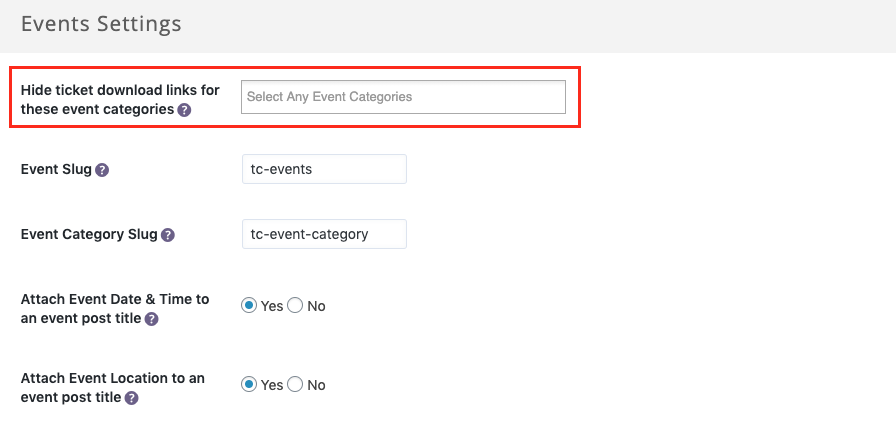
- Keep streaming links private until purchase where appropriate.
- Use separate ticket types for online and offline access.
- Test confirmation emails for each format before sales begin.
Deliver the Right Post-Purchase Information
The confirmation email is where mixed-format ticketing either feels seamless or becomes confusing. For offline events, the email should make the ticket download or QR code easy to find. For online events, it should make the streaming URL and access instructions obvious.
| Event type | Buyer needs | Email should include |
|---|---|---|
| Offline event | Entry ticket | Download link, QR code, venue, arrival instructions. |
| Online event | Access link | Streaming URL, time zone, login instructions, support contact. |
| Hybrid event | Chosen access type | Clear details based on the ticket purchased. |

Selling Multiple Event Types in One Order
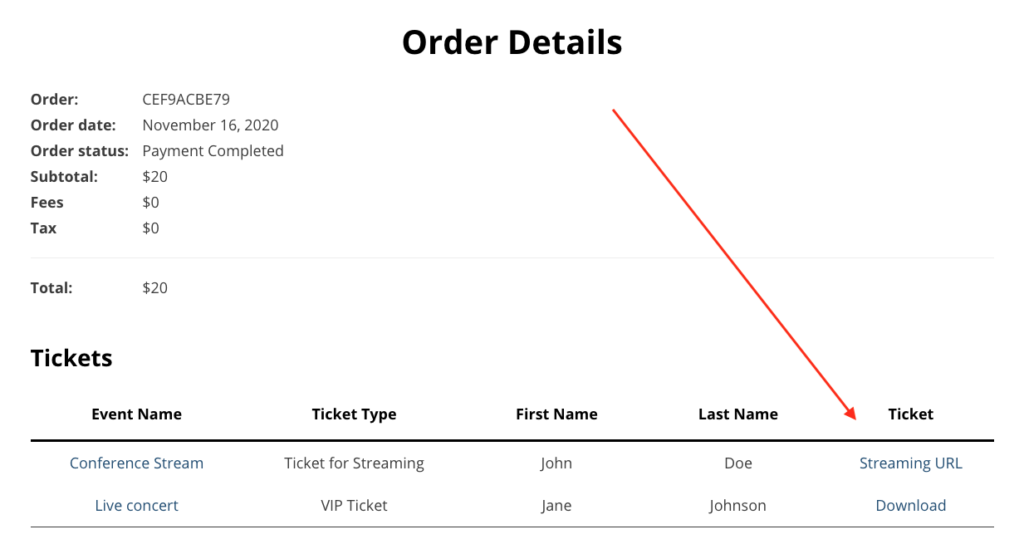
Things get more interesting when a customer buys tickets for multiple events at once. One ticket might be for an online workshop, while another is for an in-person conference. The order email needs to make both outcomes clear.
The safest approach is to show each purchased item with the correct next step: streaming URL for online tickets, ticket download or QR code for offline tickets, and clear labels so buyers do not mix them up.
Checklist for Mixed Online and Offline Events
- Label every event clearly as online, offline, or hybrid.
- Create ticket types that match the access experience.
- Check that online tickets deliver the correct streaming link.
- Check that offline tickets deliver the correct downloadable ticket.
- Test a mixed order containing both event types.
- Review confirmation emails on mobile and desktop.
- Give attendees a support contact in case access details are unclear.
Hybrid Events Need Extra Labeling
Hybrid events deserve special care because two attendees may buy access to the same event but need completely different instructions. One person may need a venue address and QR code, while another needs a streaming link and login time. If the labels are vague, both groups will contact support.
Use ticket names that describe the access type clearly, such as “In-Person Pass,” “Online Access,” or “Hybrid VIP.” Repeat the same wording on the event page, checkout, order confirmation, and reminder emails so the buyer never has to guess what they purchased.
It also helps to send separate reminder emails for each access type. Online attendees need connection details, time zone reminders, and support links. Offline attendees need arrival time, venue directions, parking, and check-in instructions.
Frequently Asked Questions
Can I sell online and offline events from one Tickera site?
Yes. The key is configuring each event and ticket type so buyers receive the right access information after purchase.
What should online event buyers receive?
They should receive the streaming URL or access instructions, the event time and time zone, and a support contact if they have trouble joining.
What should offline event buyers receive?
They should receive their ticket download, QR code or barcode, venue details, arrival instructions, and any check-in requirements.
Final Thoughts
Running online and offline events from the same website is absolutely possible. The important part is not the website structure — it is the clarity of the buyer journey.
If every ticket delivers the right information, your attendees know exactly what they bought, where to go, and how to access the event.