Quick answer
Tickera 3.6 is the biggest visual release in the plugin’s history. It replaces the old static ticket editor with a true drag-and-drop Ticket Designer that renders a pixel-perfect, live PDF preview, ships a library of ready-made templates, and adds a refreshed front-end and admin. Your existing tickets keep working, and you update in one click from your WordPress dashboard.
- Design tickets visually and see the exact PDF as you build, with embedded fonts.
- Start from professionally designed templates for weddings, concerts, conferences and more.
- Enjoy a cleaner buying experience with the redesigned front-end and checkout.
In this guide
- The all-new Ticket Designer
- A library of ready-made templates
- Before and after
- A brand-new front-end design
- A refreshed, restyled admin
- Moving over is painless
- Polished where it counts
- How to update
- FAQ
For years, Tickera has quietly powered millions of tickets behind the scenes. Reliable, always. But making a ticket actually look beautiful used to be harder than it should be. The classic template editor got the job done, yet it asked a lot of you: nudging elements, guessing how things would line up, exporting a PDF, squinting, adjusting, exporting again. What you saw on screen and what landed in the PDF did not always agree.
Tickera 3.6 fixes that — and then some. This is the release where Tickera stops simply selling tickets and starts making them gorgeous.
If your ticket is the first physical thing an attendee holds from your event, it should feel like an invitation — not a receipt.
The All-New Ticket Designer
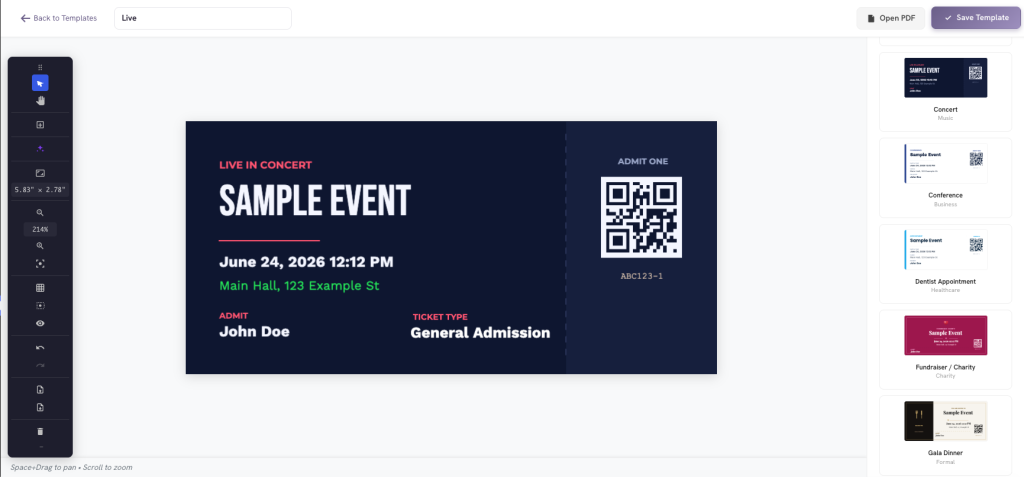
We rebuilt ticket creation from the ground up into a true drag-and-drop designer, right inside your WordPress admin. Drop in your event name, date, venue, QR code, attendee name, logo, shapes, lines and images, arrange everything exactly where you want it, style it your way, and watch it come together on a live canvas.
A live PDF preview that actually matches
This was the big one. The designer renders your ticket pixel-perfect in the PDF, exactly as it appears in the browser — same fonts, same spacing, same everything. We embedded a full font library (Montserrat, Playfair Display, Great Vibes, Bebas Neue, Oswald, Poppins and more) directly into the PDF engine, so the elegant typeface you picked is the one your attendee receives. No more export-squint-repeat.
A Library of Ready-Made Templates
Don’t want to start from a blank canvas? You don’t have to. Tickera 3.6 ships with a curated library of professionally designed, ready-to-use templates for practically every kind of event. Pick one, tweak the colors and text, and you’re done in minutes. The collection spans weddings, concerts, conferences, gala dinners, wine tastings, workshops, music festivals, theater, comedy, sports, nightclubs, cinema, New Year’s galas, yoga and wellness, fundraisers and more.
Polished tickets are not just a nice touch — they reinforce trust right through to the door. If you care about that first impression, it pairs naturally with a smooth entry experience; see our event check-in strategy guide.
Before and After
| Before | Now in 3.6 |
|---|---|
| Static template editor, lots of guesswork | Visual drag-and-drop designer |
| PDF didn’t always match the preview | Pixel-perfect, live PDF preview |
| Fonts could shift or fall back in the export | Embedded fonts — true to your design |
| Starting from scratch every time | Ready-made templates for every occasion |
A Brand-New Front-End Design
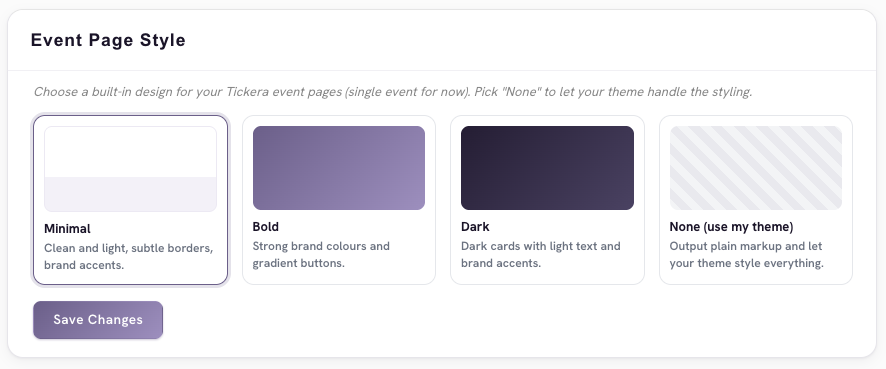
The pages your buyers actually shop on got a thorough redesign too. Tickera 3.6 introduces a modern, clean default front-end design and a set of themes spanning your single event pages, the tickets cart and the checkout flow. Typography and sizing are now consistent from the first click to the final confirmation — a calmer, more trustworthy buying experience that looks at home in any modern WordPress site.
A cleaner checkout is also a higher-converting one. If you are optimizing the full path to purchase, our guides on the event landing page and selling more event tickets go deeper on conversion.
A Refreshed, Restyled Admin
Running events should feel effortless. We’ve given the Tickera admin a visual refresh — clearer screens, a more cohesive look, and the new Ticket Designer woven right in. Choosing a ticket layout now happens through a single, unified template selector on the ticket type screen, so there’s one obvious place to go.
Moving Over Is Painless
If you’re upgrading from an older version, nothing breaks. Your existing tickets keep working. When you’re ready, switch a ticket type to a Designer template from the same selector you already use. Once everyone has moved on, the old classic templates interface quietly steps aside so your admin stays clean and uncluttered — no orphaned menus, no leftover options.
Polished Where It Counts
A great release isn’t only about the headline. Tickera 3.6 is full of quieter improvements that make everything feel solid:
- Embedded fonts for true PDF parity with the editor.
- Full WooCommerce (Bridge) compatibility — event, date, location, category, terms and buyer details all resolve correctly on Designer tickets.
- Variable products done right — the exact variation now shows on the ticket, just like before.
- Reliable PDF generation across downloads and email attachments.
- Sensible defaults — every element you add lands neatly inside the ticket, whatever its size.
How to Update
Tickera 3.6 is available now. Update it from Plugins → Installed Plugins in your WordPress dashboard, just like any other update. If you don’t run Tickera yet, you can get Tickera here.
Using WooCommerce? If you sell tickets through WooCommerce, also update Bridge for WooCommerce to 1.7.5 or higher alongside Tickera 3.6. Tickera will show a reminder in your admin if an older Bridge version is detected.
Final Thoughts
Tickets are the first tangible piece of your event an attendee holds, and now they can look the part without a design team or a single line of code. With the new Ticket Designer, a live PDF preview that finally tells the truth, a library of templates, and a cleaner front-end and admin, Tickera 3.6 turns a routine step into a brand moment. Update today and design a ticket worth keeping.
FAQ
What is the Tickera Ticket Designer?
It’s a drag-and-drop ticket builder inside your WordPress admin. You place elements like the event name, date, venue, QR code, attendee name, logo, shapes and images on a live canvas, style them freely, and the PDF your attendee receives matches the canvas exactly.
Will my existing tickets break after updating to 3.6?
No. Existing tickets keep working after the update. You can switch a ticket type to a Designer template whenever you’re ready, using the same template selector you already use.
Does the Ticket Designer work with WooCommerce?
Yes. Tickera 3.6 has full Bridge for WooCommerce compatibility — event, date, location, category, terms, buyer details and product variations resolve correctly on Designer tickets. Make sure Bridge for WooCommerce is updated to 1.7.5 or higher.
Why didn’t my PDF tickets match the preview before?
The classic editor rendered the on-screen preview and the exported PDF differently, and fonts could fall back during export. Tickera 3.6 embeds the full font library directly into the PDF engine, so the PDF is pixel-perfect and the fonts you chose are the ones that ship.
How do I update to Tickera 3.6?
Go to Plugins → Installed Plugins in your WordPress dashboard and update Tickera like any other plugin. If you use WooCommerce, update Bridge for WooCommerce to 1.7.5 or higher at the same time.