Gift vouchers are common in e-commerce for a simple reason: they remove the pressure of choosing the perfect thing for someone else.
That logic works well for event ticketing too. If your website sells tickets for multiple events, different dates, add-ons, workshops, classes, or recurring experiences, a gift voucher gives customers a flexible way to buy access now while letting the recipient choose the event later.
For organizers, vouchers can add another revenue path without creating a complicated new sales process. With Tickera, WooCommerce, Bridge for WooCommerce, and a free gift card plugin, you can add gift vouchers to your ticketing store in a straightforward way.
Short version: If you sell Tickera tickets through WooCommerce, you can use a WooCommerce gift card plugin to sell gift vouchers that recipients redeem later toward event tickets in your store.
Why Gift Vouchers Make Sense for Event Ticketing
An event ticketing website is still a kind of online store. The products just happen to be experiences, access, seats, sessions, workshops, or memberships instead of physical items.
That makes vouchers useful in several situations:
- customers want to gift an experience but do not know which date to choose
- companies want to buy ticket credit for employees or clients
- families want to contribute toward a workshop, class, or festival pass
- fans want to support an organizer before deciding on a specific event
- recipients need flexibility because event availability can change
Instead of forcing the buyer to guess, a voucher lets the recipient decide later.
What You Need
This setup uses Tickera together with WooCommerce through Bridge for WooCommerce. With Bridge active, Tickera tickets are sold as WooCommerce products, which means your ticketing store can use WooCommerce payment gateways, coupons, reporting, and compatible gift card plugins.
For the voucher part, the original setup uses PW WooCommerce Gift Cards, a free plugin available from the WordPress.org plugin repository.
- Tickera
- WooCommerce
- Bridge for WooCommerce
- PW WooCommerce Gift Cards or a similar WooCommerce gift card plugin
Once those pieces are installed and active, your tickets and vouchers can live in the same WooCommerce-powered store.
Create the Gift Voucher Product
Creating the voucher product is similar to creating any other WooCommerce product.
- Go to WooCommerce Products.
- Create a new product.
- In the Product data dropdown, choose PW Gift Card.
- Enter one voucher amount or several preset amounts.
- Publish the product and test the purchase flow.
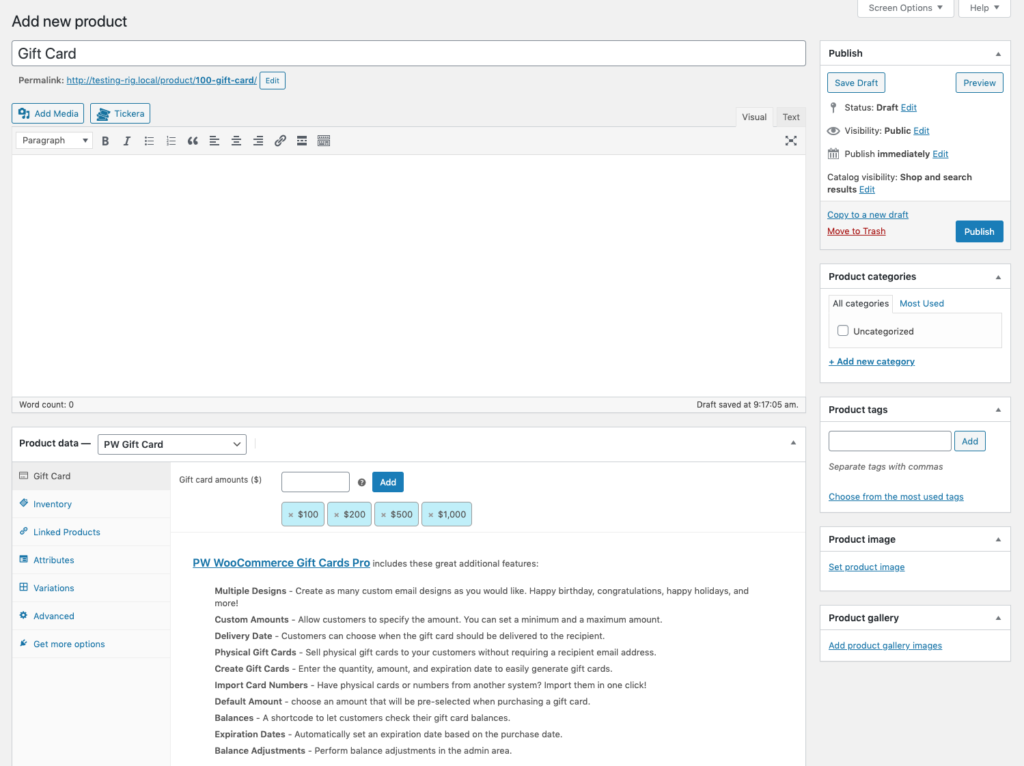
You can offer one fixed amount, such as $50, or several options such as $50, $100, and $200. Multiple preset amounts give buyers flexibility while still keeping the product simple.
What the Customer Sees
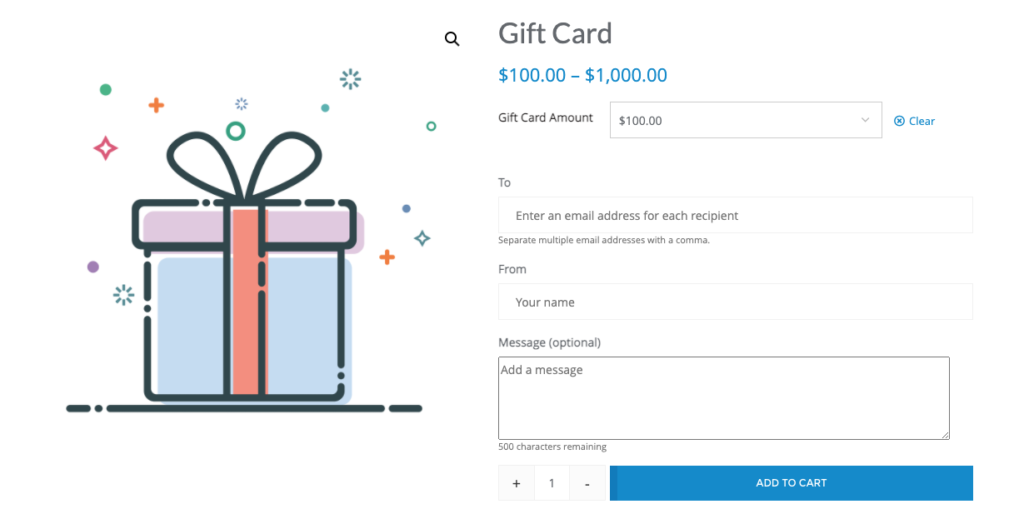
When the customer visits the gift voucher product page, they choose the amount and fill in a few extra fields for the recipient.
- recipient email address
- recipient name
- sender name
- optional personal message
After purchase, the recipient receives an email with the gift voucher details and a unique gift card number. They can use that code at checkout when buying tickets from your WooCommerce-powered Tickera store, as long as the voucher still has available balance.
Voucher Email Design
The default voucher email is functional and fairly minimal. For many organizers, that is enough. The free version of PW WooCommerce Gift Cards allows some basic styling, such as color adjustments, but it does not try to become a full email design system.
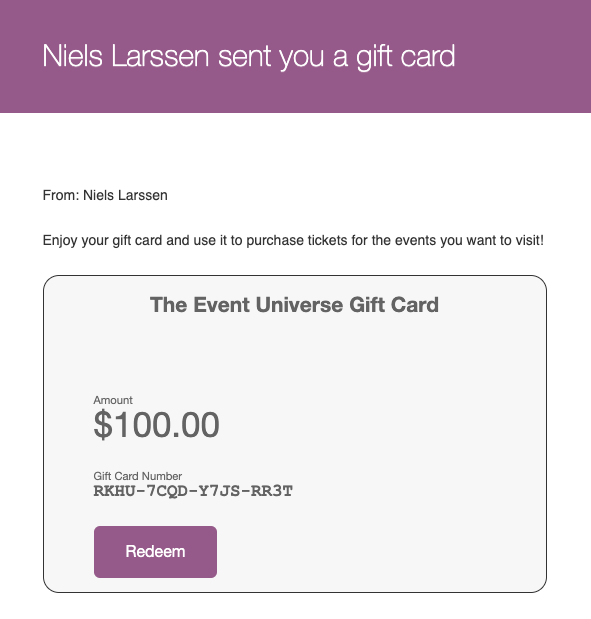
If you need more advanced layouts, stronger branding, or additional gift card features, the plugin authors offer a pro version. But if your goal is simply to add functional vouchers without increasing the budget, the free version can be a practical starting point.
How Gift Vouchers Can Support Revenue
Gift vouchers give customers one more way to buy from you. They can purchase tickets for themselves, or they can buy credit for someone else who will choose an event later.
Voucher amounts can also be planned strategically. If most tickets cost around $60, offering $100 or $200 vouchers can encourage recipients to buy additional tickets, upgrades, or add-ons so they use the full value.
There are a few possible benefits:
- you create another purchase option for people who are not ready to choose an event
- recipients may discover events they would not have bought otherwise
- voucher buyers can support your brand during holidays, birthdays, or corporate gifting periods
- unused balances can encourage a second purchase
- vouchers keep your events in someone’s mind until they redeem the code
Like any promotion tool, vouchers work best when they are easy to find, easy to understand, and connected to a clear sales campaign.
Practical Setup Tips
- Add the voucher product to your main ticketing store navigation.
- Create a clear product title, such as “Event Gift Voucher” or “Ticket Gift Card”.
- Explain that the voucher can be redeemed toward eligible event tickets.
- Choose voucher amounts that match your average ticket price and common order value.
- Test the full purchase, email, and redemption flow before promoting it.
- Confirm whether vouchers apply to all tickets or only selected products.
- Make refund and expiry rules clear before customers buy.
The setup itself is simple, but the buyer experience still needs clarity. A confused gift buyer is less likely to complete checkout.
Good Times to Promote Event Gift Vouchers
Gift vouchers are especially useful when people are already looking for flexible gift ideas.
- holiday campaigns
- Black Friday and Cyber Monday
- Valentine’s Day
- Mother’s Day and Father’s Day
- graduation season
- corporate gifting periods
- early campaign teasers before full event details are announced
If you run recurring events, workshops, classes, or seasonal programs, vouchers can stay useful throughout the year instead of being limited to one campaign.
Final Thoughts
Gift vouchers are not complicated, but they can add useful flexibility to your ticketing store.
They help buyers give an experience without choosing the exact event for someone else. They give recipients freedom. And they give organizers one more way to generate revenue, especially when vouchers are promoted at the right time and priced thoughtfully.
If you are already using Tickera with WooCommerce, adding gift vouchers is a small setup that can fit naturally into the way your store already works.
Recommended Reading
- Black Friday and event ticket sales
- Event ticket pricing strategy
- How to sell event tickets with WooCommerce
FAQ
Can I sell gift vouchers for my events?
Yes. With a gift voucher or gift card option, you can sell vouchers that recipients later redeem toward ticket purchases.
How do gift vouchers work with ticketing?
A buyer purchases a voucher with a code or value, and the recipient applies that code at checkout toward the tickets they want.
Are gift vouchers good for events?
They are. Vouchers bring in early revenue, make easy gifts, and often introduce new attendees who redeem them and discover your events.