Tickera is flexible out of the box, but some event workflows need extra data that is specific to the organizer, venue, attendee process, or reporting setup. That is where custom meta fields become useful.
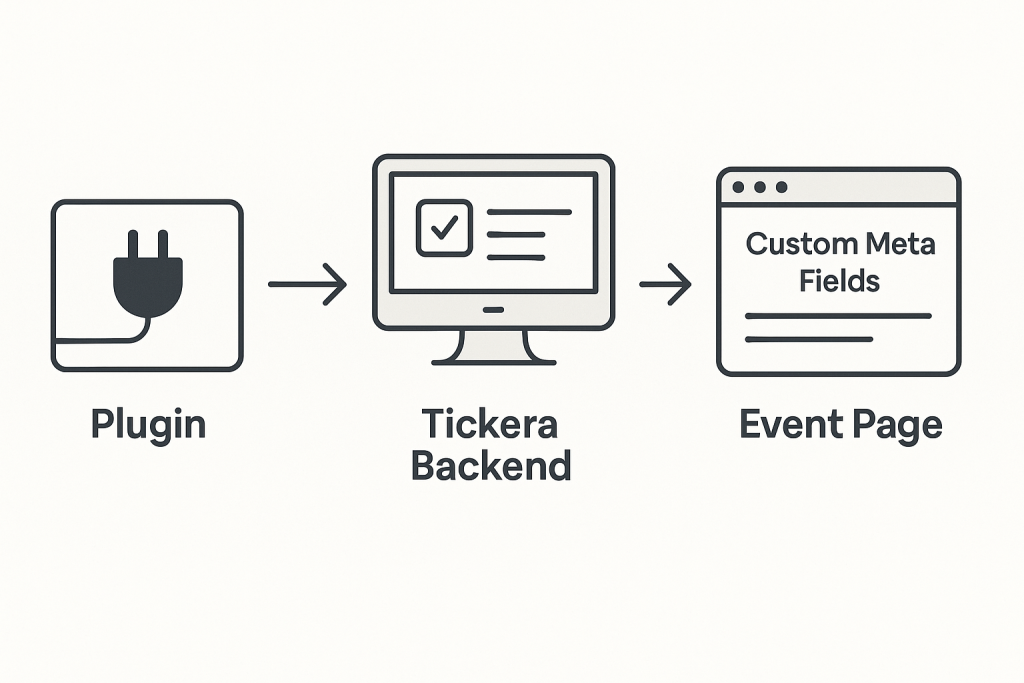
With Tickera hooks and WordPress meta handling, developers can add custom fields in the Tickera backend and then display or use those values on the front end. This guide keeps the original code examples, but frames the process more clearly so you know what you are building and where each part belongs.
Short version: create a small custom plugin or use Code Snippets, hook into Tickera’s meta fields array, save your custom field, and display the stored value where your event workflow needs it.
When Custom Tickera Meta Fields Are Useful
- Adding venue-specific internal notes.
- Storing sponsor, room, or session information.
- Saving custom access instructions for staff.
- Showing extra event details on the front end.
- Connecting Tickera data with a custom reporting workflow.
Developer Safety Notes Before You Start
- Do not edit Tickera core files directly.
- Use a small custom plugin, child theme, or Code Snippets.
- Test on staging before using custom code on a live ticketing site.
- Back up the site before adding or changing PHP snippets.
- Sanitize, validate, and escape custom field values properly.
How to Create the Plugin for Your Code
To avoid changing any original files in a theme or a plugin, we’ll create a custom plugin in which we’ll add filters to change the values in the original plugin. Below you’ll see the basic layout of a plugin with a few things you might need later on. If you’re not sure how to create plugins from scratch, check out Smashing Magazine tutorial. However, if you are not that interested in all the nitty-gritty details just copy the code below and activate the plugin. As another alternative, you can use plugins such as Code Snippets which eliminates the need to create a plugin from scratch and makes it possible to simply add code snippets and activate/deactivate them similarly to what you would do with plugins. Please note the commented areas in the code below. Those are the places for filters and functions.
/*
  Plugin Name: Tickera - Custom Meta Fields
  Plugin URI: http://tickera.com/
  Description:
  Author: Tickera.com
  Author URI: http://tickera.com/
  Version: 1.0
  TextDomain: tc


  Copyright 2025 Tickera (http://tickera.com/)
 */

if (!defined('ABSPATH'))
    exit; // Exit if accessed directly

if (!class_exists('TC_Custom_Meta')) {

    class TC_Custom_Meta {

        var $version = '1.0';
        var $title = 'Tickera - Custom Meta';
        var $name = 'tc-custom-add-custom-meta';
        var $dir_name = 'tc-custom-add-custom-meta';
        var $location = 'plugins';
        var $plugin_dir = '';
        var $plugin_url = '';

        function __construct() {

            $this->init_vars();

          <!-- WE'LL USE THIS AREA TO ADD FILTERS -->

         }

        function init_vars() {
            //setup proper directories
            if (defined('WP_PLUGIN_URL') && defined('WP_PLUGIN_DIR') && file_exists(WP_PLUGIN_DIR . '/' . $this->dir_name . '/' . basename(__FILE__))) {
                $this->location = 'subfolder-plugins';
                $this->plugin_dir = WP_PLUGIN_DIR . '/' . $this->dir_name . '/';
                $this->plugin_url = plugins_url('/', __FILE__);
            } else if (defined('WP_PLUGIN_URL') && defined('WP_PLUGIN_DIR') && file_exists(WP_PLUGIN_DIR . '/' . basename(__FILE__))) {
                $this->location = 'plugins';
                $this->plugin_dir = WP_PLUGIN_DIR . '/';
                $this->plugin_url = plugins_url('/', __FILE__);
            } else if (is_multisite() && defined('WPMU_PLUGIN_URL') && defined('WPMU_PLUGIN_DIR') && file_exists(WPMU_PLUGIN_DIR . '/' . basename(__FILE__))) {
                $this->location = 'mu-plugins';
                $this->plugin_dir = WPMU_PLUGIN_DIR;
                $this->plugin_url = WPMU_PLUGIN_URL;
            } else {
                wp_die(sprintf(__('There was an issue determining where %s is installed. Please reinstall it.', 'tccsv'), $this->title));
            }
        }

<!-- WE'LL USE THIS AREA TO ADD FUNCTIONS -->

    }

}
Hooking into the Tickera meta fields array
Meta boxes in Tickera are added by modifying the existing array. So, first, we need to hook into the array via tc_event_fields filter. We’ll hook into the filter by using the WordPress function add_filter in our construction method. We will then continue by adding tc_add_meta_fields function. As you can see from the code below, we have one variable passed into the function, which is the array we’ll be modifying.add_filter('tc_event_fields', array(&$this, 'tc_add_meta_fields'), 10, 1);
     $default_fields[] = array(
                    'field_name' => 'tc_event_room', // The name of the field that will be saved in the database
                    'field_title' => __('Event Room', 'tc'), // The title of the meta field in the WordPress admin area
                    'field_type' => 'text', // Type of the input field to show on the front. The following values are accepted: text, textarea, textarea_editor, image.
                    'field_description' => '', // The description will be visible in the backend
                    'table_visibility' => false, // If set to 'true' the value of this metabox will be visible in the Tickera > Events table
                    'post_field_type' => 'post_meta', // You can just leave this field as post meta, we use this as a helper for some other functions
                    'show_in_post_type' => true);
Example: text, textarea, editor, and image fields
Let’s see now what the example function looks like. In the example below, we have created four new fields: text, textarea, textarea with editor and an image upload box. At the end of the function, we have returned a modified array.function tc_add_meta_fields($default_fields){
//how to add standard text input meta field
$default_fields[] = array(
'field_name' => 'tc_event_room',
'field_title' => __('Event Room', 'tc'),
'field_type' => 'text',
'field_description' => '',
'table_visibility' => true,
'post_field_type' => 'post_meta',
'show_in_post_type' => false);
//how to add textarea meta field
$default_fields[] = array(
'field_name' => 'tc_additional_info',
'field_title' => __('Additional Info', 'tc'),
'field_type' => 'textarea',
'field_description' => '',
'table_visibility' => true,
'post_field_type' => 'post_meta',
'show_in_post_type' => false);
//how to add meta field for textarea with WordPress editor
$default_fields[] = array(
'field_name' => 'tc_additional_info_textarea',
'field_title' => __('Additional Info Textarea', 'tc'),
'field_type' => 'textarea_editor',
'field_description' => '',
'table_visibility' => true,
'post_field_type' => 'post_meta',
'show_in_post_type' => false);
//How to add additional meta field with an upload button for images.
$default_fields[] = array(
'field_name' => 'tc_additional_image',
'field_title' => __('Additional Image', 'tc'),
'field_type' => 'image',
'field_description' => '',
'table_visibility' => true,
'post_field_type' => 'post_meta',
'show_in_post_type' => false);
return $default_fields;
}
/*
  Plugin Name: Tickera - Custom Meta Fields
  Plugin URI: http://tickera.com/
  Description:
  Author: Tickera.com
  Author URI: http://tickera.com/
  Version: 1.0
  TextDomain: tc


  Copyright 2025 Tickera (http://tickera.com/)
 */

if (!defined('ABSPATH'))
    exit; // Exit if accessed directly

if (!class_exists('TC_Custom_Meta')) {

    class TC_Custom_Meta {

        var $version = '1.0';
        var $title = 'Tickera - Custom Meta';
        var $name = 'tc-custom-add-custom-meta';
        var $dir_name = 'tc-custom-add-custom-meta';
        var $location = 'plugins';
        var $plugin_dir = '';
        var $plugin_url = '';

        function __construct() {

            $this->init_vars();

            add_filter('tc_event_fields', array(&$this, 'tc_add_meta_fields'), 10, 1);

         }

        function init_vars() {
            //setup proper directories
            if (defined('WP_PLUGIN_URL') && defined('WP_PLUGIN_DIR') && file_exists(WP_PLUGIN_DIR . '/' . $this->dir_name . '/' . basename(__FILE__))) {
                $this->location = 'subfolder-plugins';
                $this->plugin_dir = WP_PLUGIN_DIR . '/' . $this->dir_name . '/';
                $this->plugin_url = plugins_url('/', __FILE__);
            } else if (defined('WP_PLUGIN_URL') && defined('WP_PLUGIN_DIR') && file_exists(WP_PLUGIN_DIR . '/' . basename(__FILE__))) {
                $this->location = 'plugins';
                $this->plugin_dir = WP_PLUGIN_DIR . '/';
                $this->plugin_url = plugins_url('/', __FILE__);
            } else if (is_multisite() && defined('WPMU_PLUGIN_URL') && defined('WPMU_PLUGIN_DIR') && file_exists(WPMU_PLUGIN_DIR . '/' . basename(__FILE__))) {
                $this->location = 'mu-plugins';
                $this->plugin_dir = WPMU_PLUGIN_DIR;
                $this->plugin_url = WPMU_PLUGIN_URL;
            } else {
                wp_die(sprintf(__('There was an issue determining where %s is installed. Please reinstall it.', 'tccsv'), $this->title));
            }
        }

        function tc_add_meta_fields($default_fields){


            $default_fields[] = array(
                    'field_name' => 'tc_event_room',
                    'field_title' => __('Event Room', 'tc'),
                    'field_type' => 'text',
                    'field_description' => '',
                    'table_visibility' => false,
                    'post_field_type' => 'post_meta',
                    'show_in_post_type' => true);

            $default_fields[] = array(
                    'field_name' => 'tc_additional_info',
                    'field_title' => __('Additional Info', 'tc'),
                    'field_type' => 'textarea',
                    'field_description' => '',
                    'table_visibility' => false,
                    'post_field_type' => 'post_meta',
                    'show_in_post_type' => false);

            $default_fields[] = array(
                    'field_name' => 'tc_additional_info_textarea',
                    'field_title' => __('Additional Info Textarea', 'tc'),
                    'field_type' => 'textarea_editor',
                    'field_description' => '',
                    'table_visibility' => true,
                    'post_field_type' => 'post_meta',
                    'show_in_post_type' => false);

            $default_fields[] = array(
                    'field_name' => 'tc_additional_image',
                    'field_title' => __('Additional Image', 'tc'),
                    'field_type' => 'image',
                    'field_description' => '',
                    'table_visibility' => true,
                    'post_field_type' => 'post_meta',
                    'show_in_post_type' => false);

            return $default_fields;

        }

    }

}

$tc_custom_meta = new TC_Custom_Meta();
Displaying custom meta values on the event page
Now that we added meta fields, we need a way to display them somehow. The easiest way would be to just hook into the the_content filter with the line below added to the construct.add_filter('the_content', array(&$this, 'tc_add_tickera_custom_meta'), 10, 1);<?php
function tc_add_tickera_custom_meta( $content ) {
$tc_event_room = get_post_meta(get_the_id(), 'tc_event_room', true);
$tc_additional_info = get_post_meta(get_the_id(), 'tc_additional_info', true);
$tc_additional_info_textarea = get_post_meta(get_the_id(), 'tc_additional_info_textarea', true);
$tc_additional_image = get_post_meta(get_the_id(), 'tc_additional_image_file_url', true);
// Check if we're inside the main loop in a single Post.
if ( is_singular() && get_post_type(get_the_ID()) == 'tc_events' ) {
return '<strong>Event Room: </strong>'.$tc_event_room . '<br /> ' .
'<strong>Additional Info: </strong>' .$tc_additional_info . '<br />' .
'<strong>Additional Info Textarea: </strong>' . $tc_additional_info_textarea . '<br />' .
'<strong>Additional Image: </strong>' .
$tc_additional_image . '<br />' .
$content;
}
return $content; }
?> As a reference, below is complete plugin that we have just created.
<?php

/*
  Plugin Name: Tickera - Custom Meta Fields
  Plugin URI: http://tickera.com/
  Description:
  Author: Tickera.com
  Author URI: http://tickera.com/
  Version: 1.0
  TextDomain: tc


  Copyright 2025 Tickera (http://tickera.com/)
 */

if (!defined('ABSPATH'))
    exit; // Exit if accessed directly

if (!class_exists('TC_Custom_Meta')) {

    class TC_Custom_Meta {

        var $version = '1.0';
        var $title = 'Tickera - Custom Meta';
        var $name = 'tc-custom-add-custom-meta';
        var $dir_name = 'tc-custom-add-custom-meta';
        var $location = 'plugins';
        var $plugin_dir = '';
        var $plugin_url = '';

        function __construct() {

            $this->init_vars();

            add_filter('tc_event_fields', array(&$this, 'tc_add_meta_fields'), 10, 1);
            add_filter('the_content',  array(&$this, 'tc_add_tickera_custom_meta'), 10, 1);

         }

        function init_vars() {
            //setup proper directories
            if (defined('WP_PLUGIN_URL') && defined('WP_PLUGIN_DIR') && file_exists(WP_PLUGIN_DIR . '/' . $this->dir_name . '/' . basename(__FILE__))) {
                $this->location = 'subfolder-plugins';
                $this->plugin_dir = WP_PLUGIN_DIR . '/' . $this->dir_name . '/';
                $this->plugin_url = plugins_url('/', __FILE__);
            } else if (defined('WP_PLUGIN_URL') && defined('WP_PLUGIN_DIR') && file_exists(WP_PLUGIN_DIR . '/' . basename(__FILE__))) {
                $this->location = 'plugins';
                $this->plugin_dir = WP_PLUGIN_DIR . '/';
                $this->plugin_url = plugins_url('/', __FILE__);
            } else if (is_multisite() && defined('WPMU_PLUGIN_URL') && defined('WPMU_PLUGIN_DIR') && file_exists(WPMU_PLUGIN_DIR . '/' . basename(__FILE__))) {
                $this->location = 'mu-plugins';
                $this->plugin_dir = WPMU_PLUGIN_DIR;
                $this->plugin_url = WPMU_PLUGIN_URL;
            } else {
                wp_die(sprintf(__('There was an issue determining where %s is installed. Please reinstall it.', 'tccsv'), $this->title));
            }
        }

        function tc_add_meta_fields($default_fields){


            $default_fields[] = array(
                    'field_name' => 'tc_event_room',
                    'field_title' => __('Event Room', 'tc'),
                    'field_type' => 'text',
                    'field_description' => '',
                    'table_visibility' => false,
                    'post_field_type' => 'post_meta',
                    'show_in_post_type' => true);

            $default_fields[] = array(
                    'field_name' => 'tc_additional_info',
                    'field_title' => __('Additional Info', 'tc'),
                    'field_type' => 'textarea',
                    'field_description' => '',
                    'table_visibility' => false,
                    'post_field_type' => 'post_meta',
                    'show_in_post_type' => false);

            $default_fields[] = array(
                    'field_name' => 'tc_additional_info_textarea',
                    'field_title' => __('Additional Info Textarea', 'tc'),
                    'field_type' => 'textarea_editor',
                    'field_description' => '',
                    'table_visibility' => true,
                    'post_field_type' => 'post_meta',
                    'show_in_post_type' => false);

            $default_fields[] = array(
                    'field_name' => 'tc_additional_image',
                    'field_title' => __('Additional Image', 'tc'),
                    'field_type' => 'image',
                    'field_description' => '',
                    'table_visibility' => true,
                    'post_field_type' => 'post_meta',
                    'show_in_post_type' => false);

            $default_fields[] = array(
                    'field_name' => 'tc_additional_function',
                    'field_title' => __('Additional Function', 'tc'),
                    'field_type' => 'function',
                    'function' => 'tc_additional_function',
                    'field_description' => '',
                    'table_visibility' => true,
                    'post_field_type' => 'post_meta',
                    'show_in_post_type' => false);

            return $default_fields;

        }

        function tc_add_tickera_custom_meta( $content ) {

            $tc_event_room = get_post_meta(get_the_id(), 'tc_event_room', true);
            $tc_additional_info = get_post_meta(get_the_id(), 'tc_additional_info', true);
            $tc_additional_info_textarea = get_post_meta(get_the_id(), 'tc_additional_info_textarea', true);
            $tc_additional_image = get_post_meta(get_the_id(), 'tc_additional_image_file_url', true);


            // Check if we're inside the main loop in a single Post.
            if ( is_singular() && get_post_type(get_the_ID()) == 'tc_events' ) {
                return '<strong>Event Room: </strong>'.$tc_event_room . '<br />'
                        . '<strong>Additional Info: </strong>' .$tc_additional_info . '<br />'
                        . '<strong>Additional Info Textarea: </strong>' . $tc_additional_info_textarea . '<br />;'
                        . '<strong>Additional Image: </strong>' . $tc_additional_image .  '<br />' .
                        $content;
            }

            return $content;
        }


    }

}

$tc_custom_meta = new TC_Custom_Meta();

?>
Wrapping up
So, there you have it: a short guide on how to add custom meta fields in Tickera. If you want to see a similar plugin built on the foundation of this principle, you can check this one out. As always, we encourage you to visit our Solutions archive where you can find plethora of custom plugins for all sorts of purposes. Got any questions, ideas or suggestions? Shoot us an email to info@tickera.com and we’ll gladly hear all about it.Frequently Asked Questions
Should I add custom Tickera fields in functions.php?
You can, but a small custom plugin or Code Snippets is usually safer and easier to manage. Avoid editing Tickera plugin files directly because updates can overwrite your changes.
Do custom meta fields require PHP knowledge?
Yes. This is a developer-level customization. If you are not comfortable with PHP, hooks, sanitization, and testing, ask a developer to implement it.
Can custom meta values be displayed on the front end?
Yes. Once the value is saved as post meta, you can retrieve it and display it in templates, snippets, or custom output areas, as long as you escape the value properly.
Final Thoughts
Custom meta fields give developers a clean way to adapt Tickera to specialized event workflows. Keep the customization isolated, test carefully, and document what each field does so future maintenance is easier.