Some tickets should not work only once. A multi-day festival pass might allow one entry per day. A membership ticket might allow a few visits per week. A season pass might need controlled access across many dates without letting one ticket be scanned endlessly in a single afternoon.
That is exactly what Tickera’s time-based check-in limits are designed to handle. Since Tickera 3.4.9.9, you can limit how many times a ticket can be checked in per hour, day, week, or month.
Short version: time-based check-in limits let you control how often a ticket can be used within a specific period. They are useful for multi-day events, memberships, season passes, recurring sessions, and reducing accidental or fraudulent repeat scans.
How Time-Based Check-In Limits Work
When creating or editing a ticket type in Tickera, enable Limit check-ins on time basis. You can then choose how many check-ins are allowed and whether the limit applies per hour, day, week, or month.
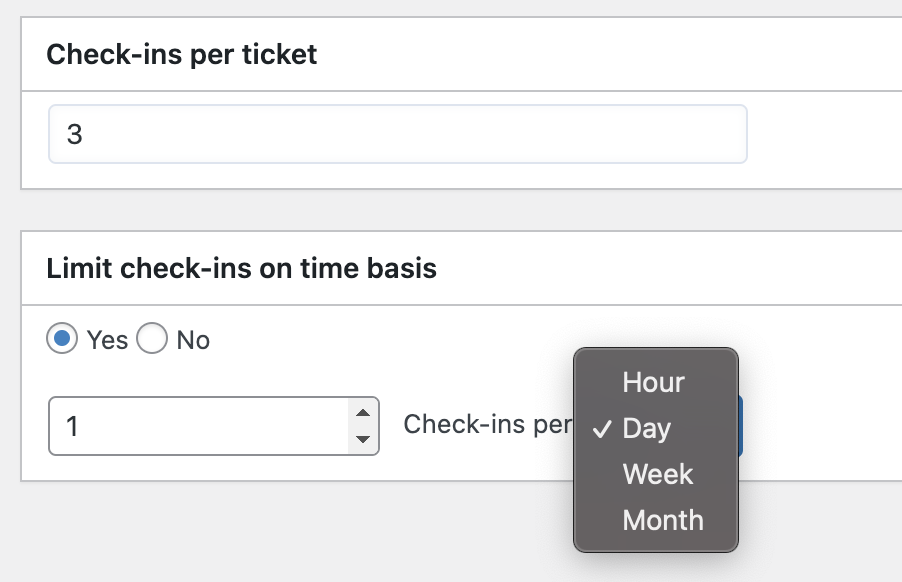
You can also combine the time-based limit with a total check-in limit. For example, one ticket can allow five check-ins total, but only one check-in per day. Tickera enforces that at the scanner, so your check-in staff do not need to remember the rule manually.
Use Case 1: Multi-Day Festivals and Conferences
For a three-day festival, you may want one ticket to grant entry once per day. Without a time-based limit, staff may need manual notes or separate tickets for each day. With Tickera, the same ticket can be valid across the event while still preventing repeat entry abuse within the same day.
| Event type | Example rule | Why it helps |
|---|---|---|
| 3-day festival | 1 check-in per day | One pass works across all days without same-day reuse. |
| Conference | 1 check-in per day | Simple daily access control for attendees. |
| Workshop series | 1 check-in per week | Controls recurring attendance over several sessions. |
| Membership | 3 check-ins per week | Allows flexible use while preventing unlimited access. |
Use Case 2: Season Tickets and Recurring Events
Season passes are another natural fit. A theater, sports club, lecture series, or community venue may sell one pass that covers multiple dates. A time-based rule makes that pass easier to manage than issuing separate tickets for every session.
This can also simplify attendee communication. Instead of sending a new ticket every week, attendees can keep one ticket and use it according to the access rules you define.
Use Case 3: Gyms, Studios, and Membership Access
Time-based limits are not only for traditional events. Gyms, yoga studios, training rooms, coworking spaces, and local clubs can use ticket-style access for memberships or prepaid visit packs.
- A yoga pass can allow one check-in per day.
- A gym membership can allow five check-ins per week.
- A workshop card can allow one check-in per session week.
- A limited trial pass can allow three total check-ins with one per day.
Use Case 4: Prevent Duplicate Scans and Fraud
Not every repeat scan is malicious. Sometimes attendees open the wrong email, staff scan the same ticket twice, or a group tries to enter through different doors. Time-based limits add a practical layer of protection by making the ticket rules automatic.
For larger events, combine this with a clear Checkinera check-in process so every gate follows the same rules.
What to Test Before Launch
- Create a test ticket with the same limits you plan to use.
- Scan it once and confirm the first check-in works.
- Scan it again inside the restricted period and confirm it is blocked.
- Test across multiple devices or gates if your team uses more than one scanner.
- Confirm staff understand the message shown for blocked repeat scans.
- Explain the access rule clearly on the event page and in ticket emails.
Frequently Asked Questions
Can one ticket be checked in once per day?
Yes. Set the time-based limit to one check-in per day. This is useful for multi-day events, festivals, and conferences.
Can I also limit the total number of check-ins?
Yes. You can combine a total check-in limit with a time-based limit, such as five total check-ins with only one allowed per day.
Will staff need to remember the time rule manually?
No. Once configured, Tickera enforces the limit automatically during check-in.
Final Thoughts
Time-based check-in limits are a small feature with a big operational impact. They make multi-day events, recurring access, memberships, and season passes easier to manage without complicated workarounds.
Set the rule, test it before launch, explain it clearly to attendees, and make sure your check-in team knows what to expect. That is how you keep access flexible without losing control.